
Latest Update Information
RACING ANALYTICS — CHANGELOG
Release 3.0.4 — December 2025 · AI Edition
🔎 Summary
RAPRO v3.0.4 (AI Edition) delivers two flagship upgrades — a customizable Form Guide and the Stage 1 rollout of the AI RAPRO Module — plus a refreshed Race Review screen, faster and more stable performance, and a long list of bug fixes and UX improvements.
The focus of this release is to:
- ⏱️ Reduce form-building time
- 🧠 Improve clarity and confidence in decision-making
- 🤖 Lay a strong foundation for expanded AI assistance in 2026
🌟 Highlights
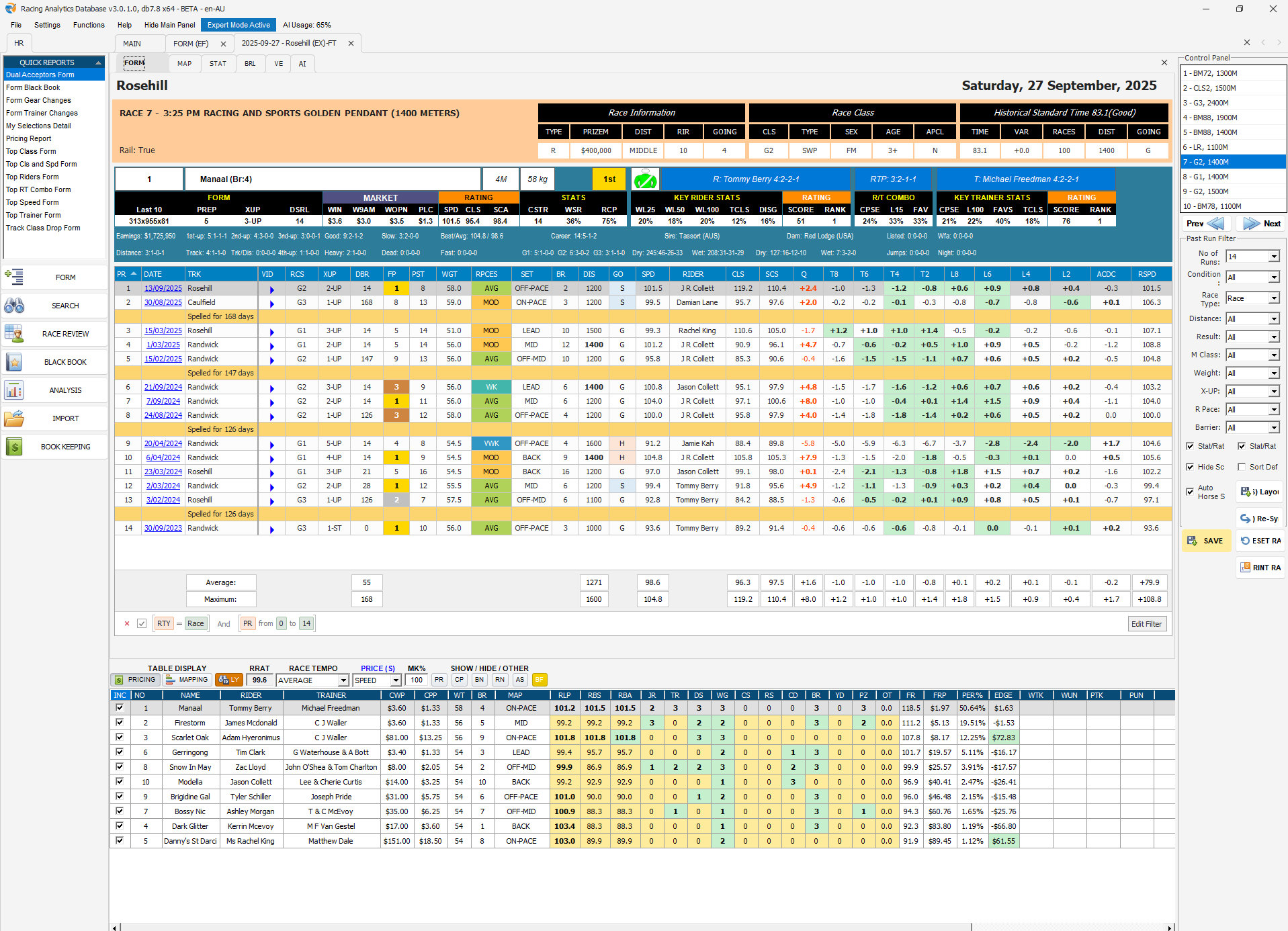
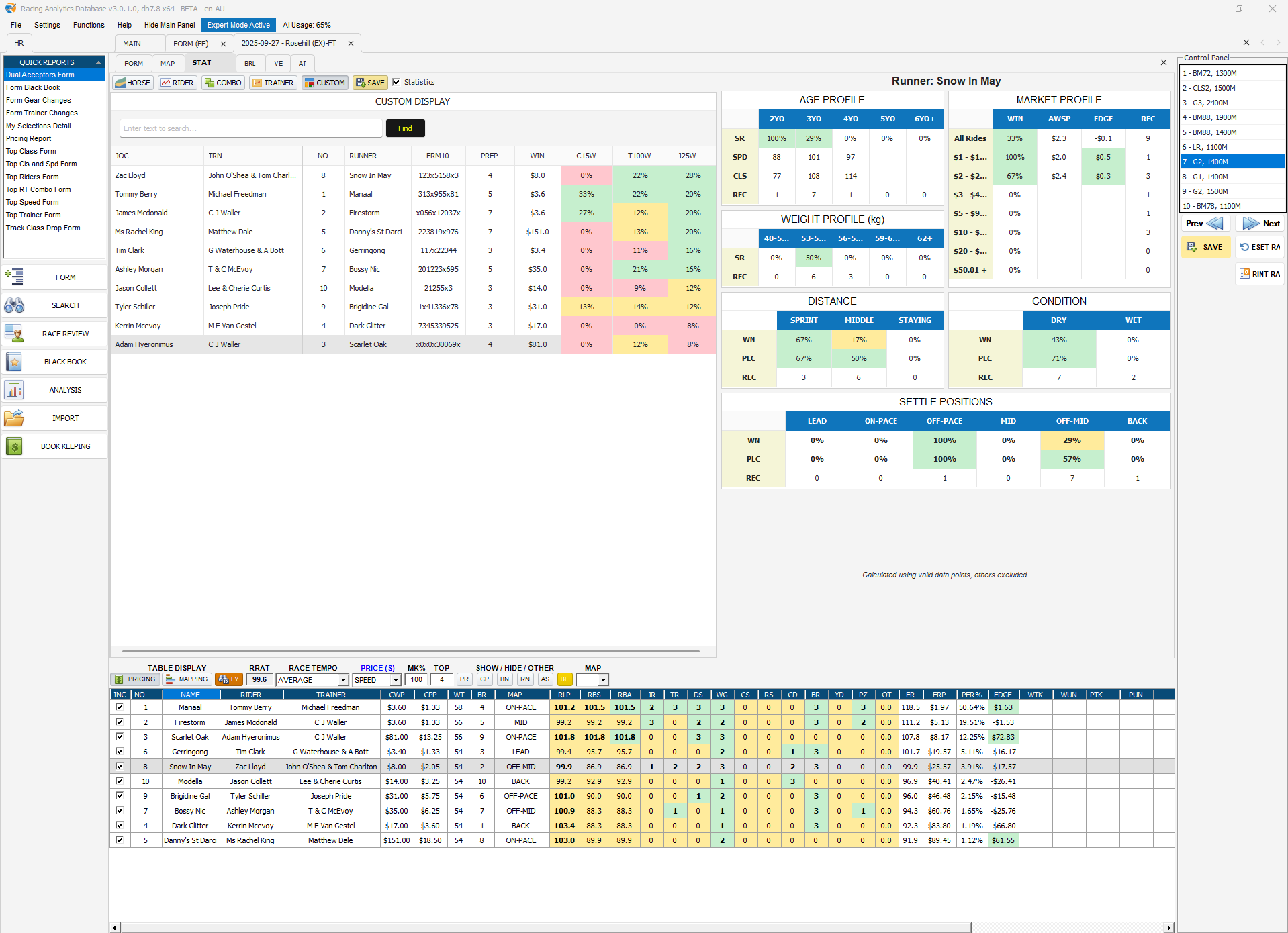
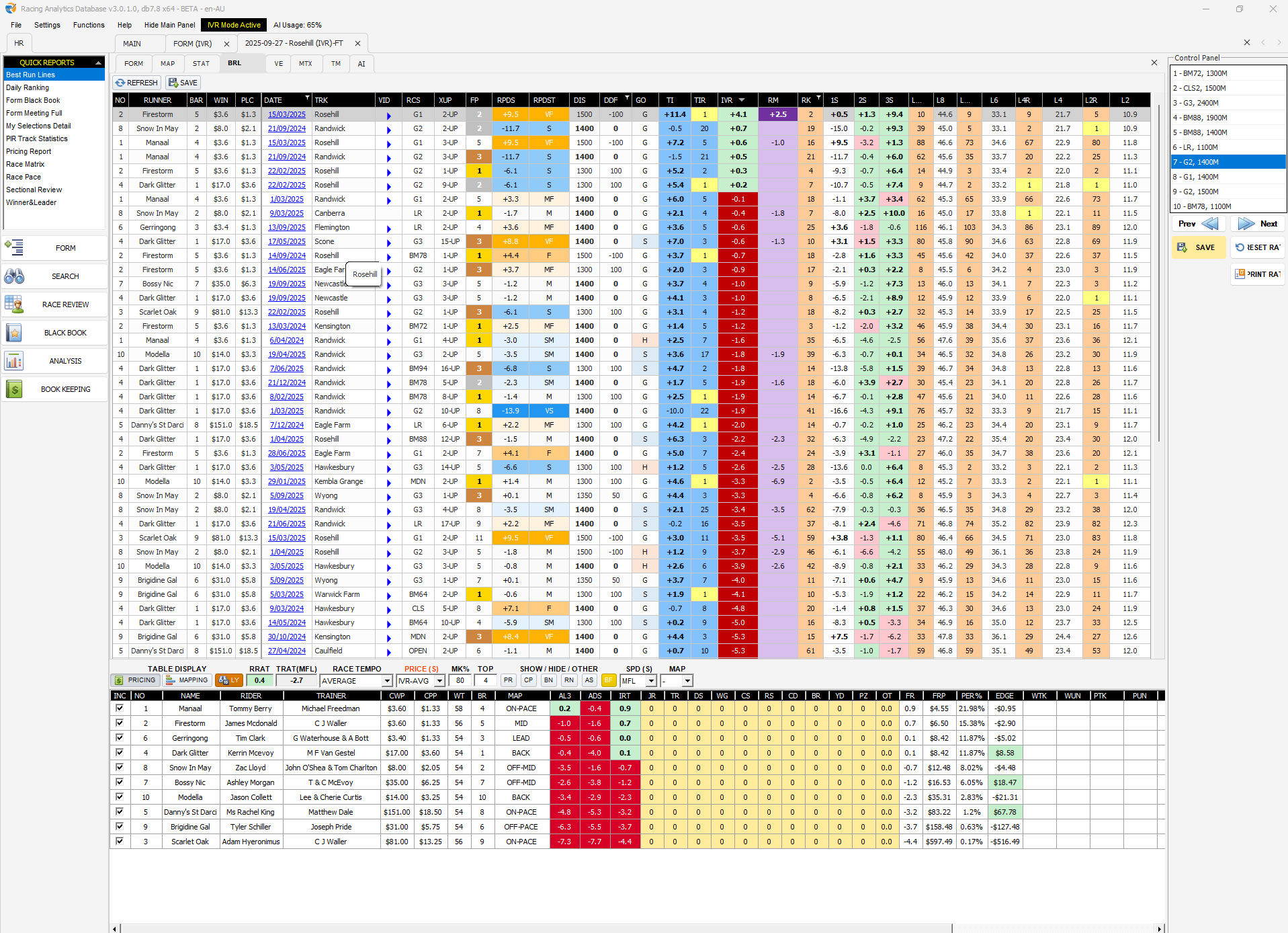
- 🧩 Customizable Form Guide (Expert & IVR)
Build your own form layouts, save them, and keep context when switching between horses, races, and meetings. - 🤖 AI RAPRO Module
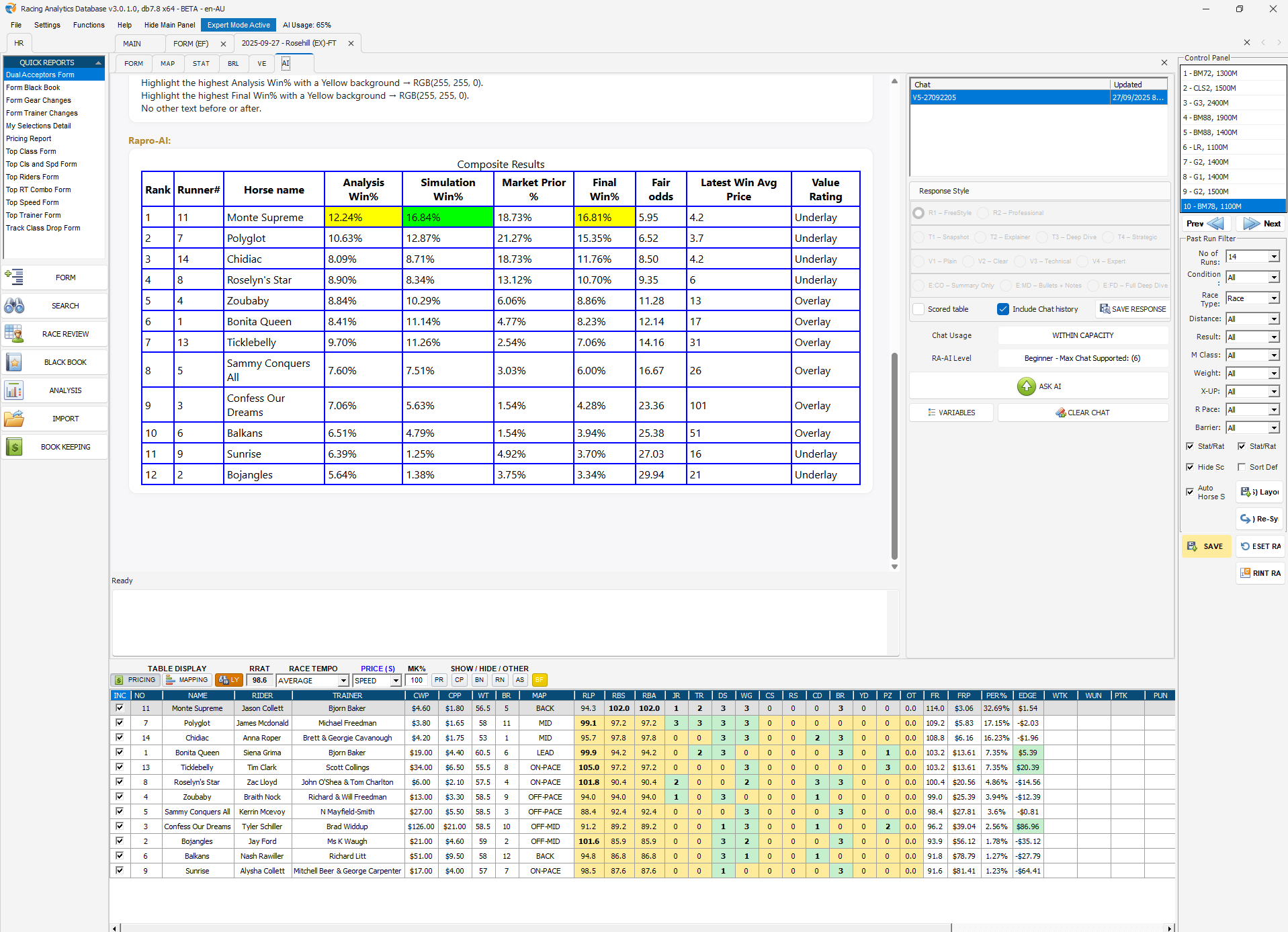
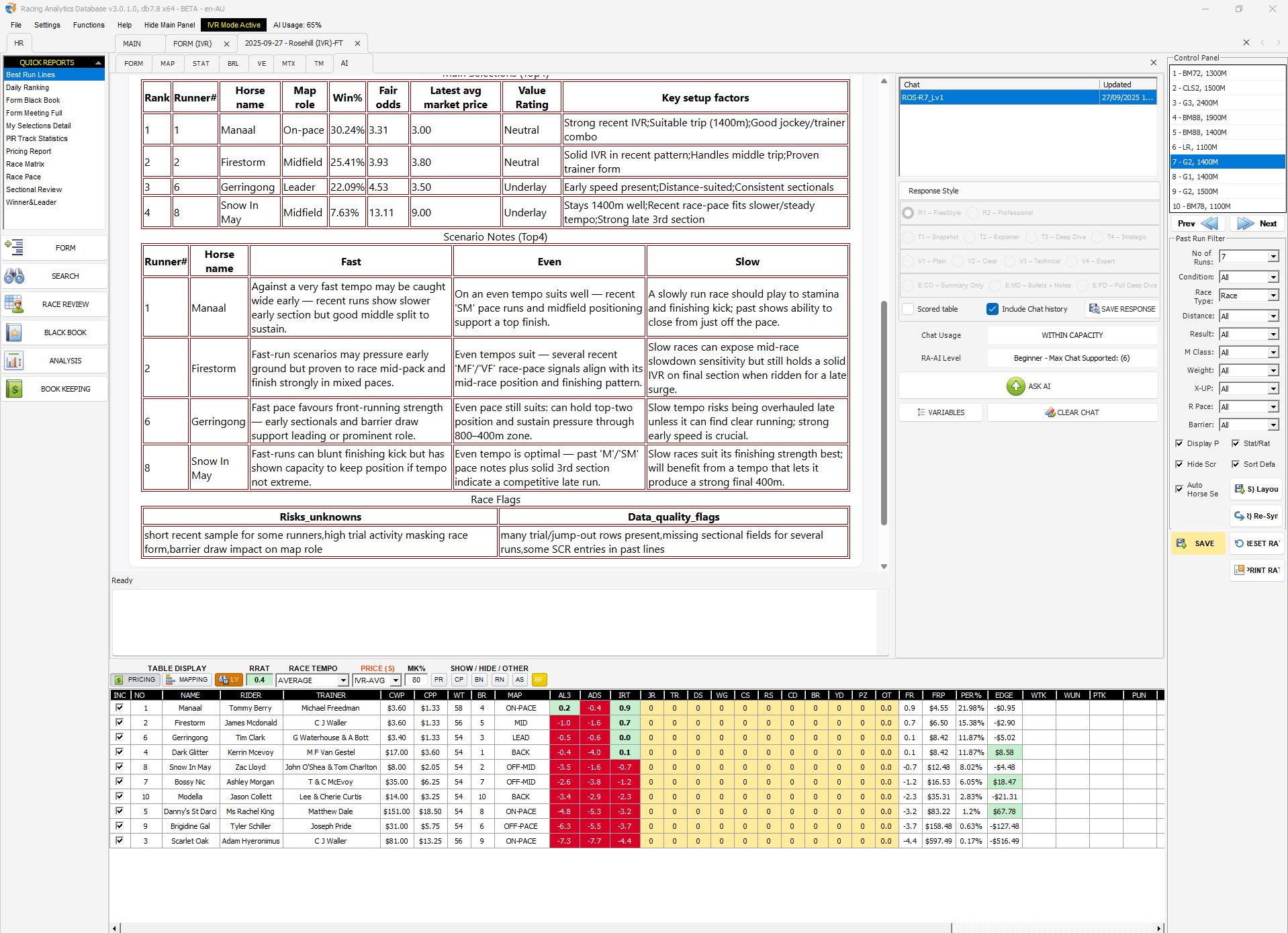
Optional add-on for users with the AI Module subscription. Race analysis, saved chats, custom prompts, short codes, scorecards, and post-race re-analysis. - 📋 Race Review (Expert)
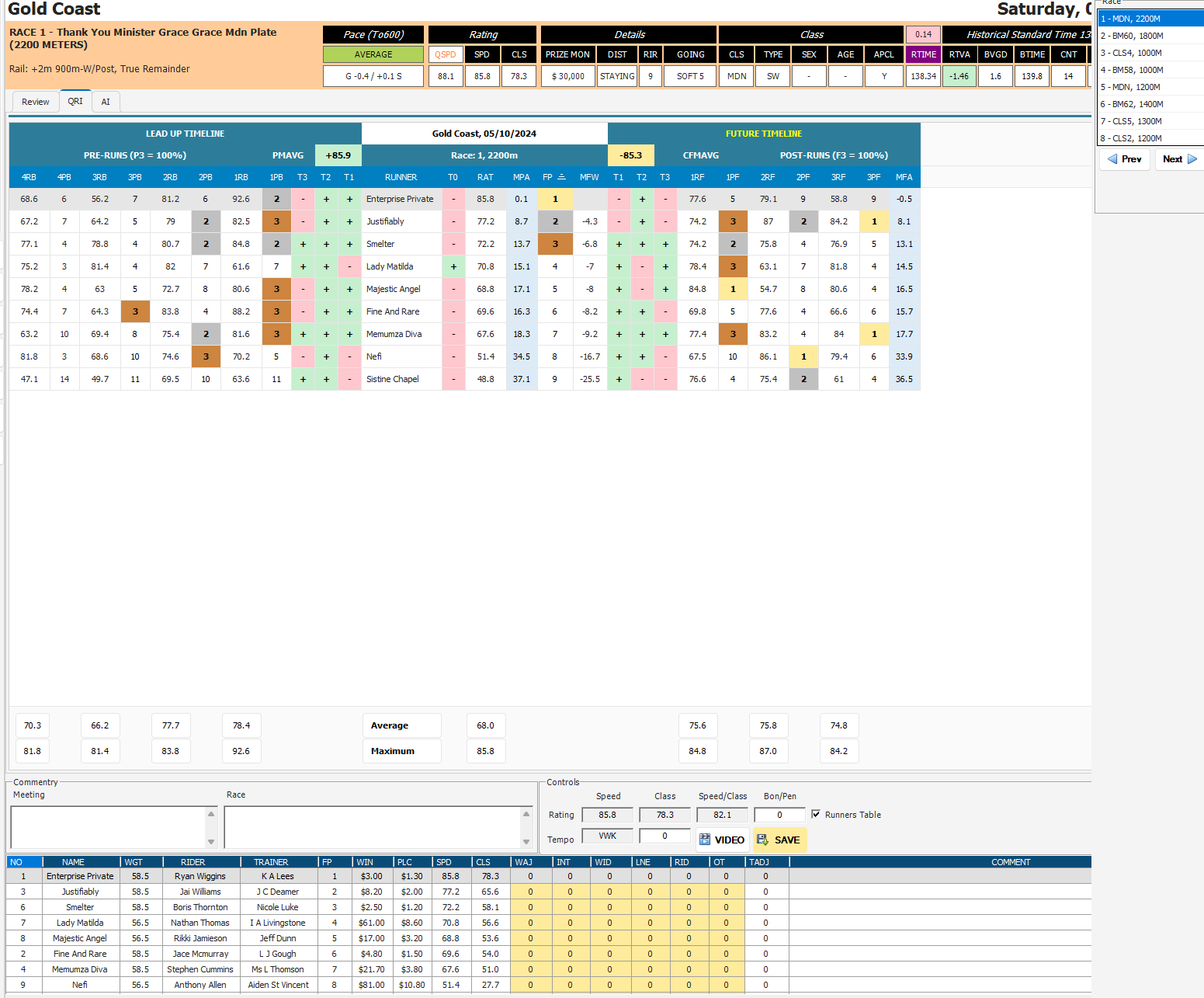
New, customizable grid with improved pace/split displays, QRI (Quality Rating Index) speed adjustment, and faster backend saving. - ⚡ Overall performance
Faster page loads, snappier data retrieval, clearer loading states, and many quality-of-life fixes across the platform.
🌐 Global Changes
- 🆕 New custom Form Guide builder for Expert and IVR modes.
- 🧠 AI RAPRO Module available in:
- Form Guide (Expert Form)
- Form Guide (IVR)
- Race Review (Expert Form)
- 🆕 Race Review screen (Expert) with a new grid and QRI integration.
- 🔍 Search / Black Book – new form screens and stats display (EX / IVR).
- 💾 Backup / Restore
- Ability to restore Analysis models across Expert, IVR, and Statfreaks (SF).
- 🛠️ Other global fixes
- Refer to detailed bug/fix/enhancement list below.
📊 Form Guide (Expert / IVR) — New Layout & Features
New Self-Building Form Guide
- Fully interactive, self-building module (activate via Expert → Form Settings).
- Multiple in-race tabs: past runs now attach within the relevant race tab.
- Customizable columns:
- Show / hide, move, filter, sort, and save layouts.
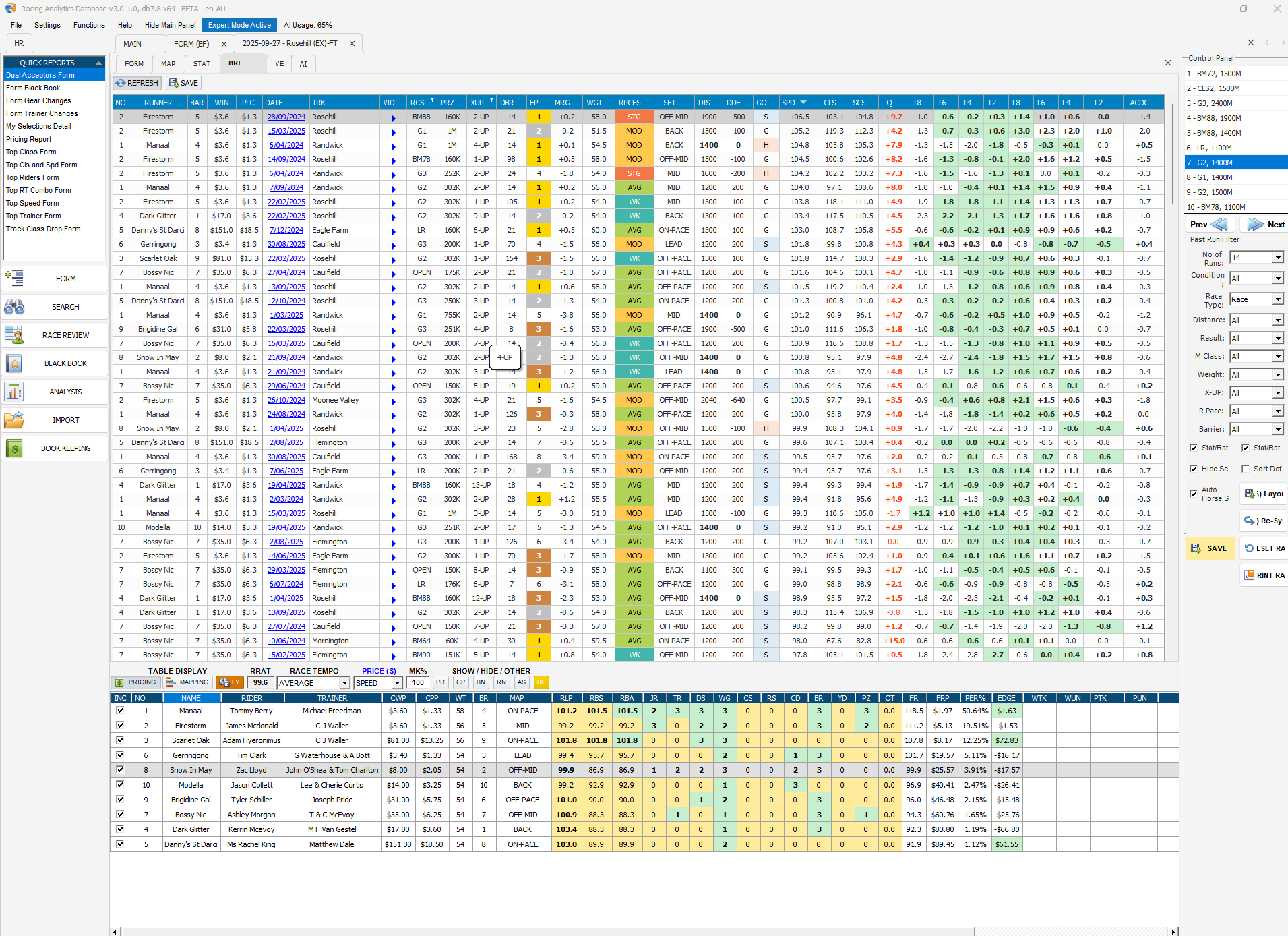
- Interactive Best-Run-Line (BRL) table:
- Available in Expert Form and IVR mode.
- Adjust, sort, filter, and save layouts.
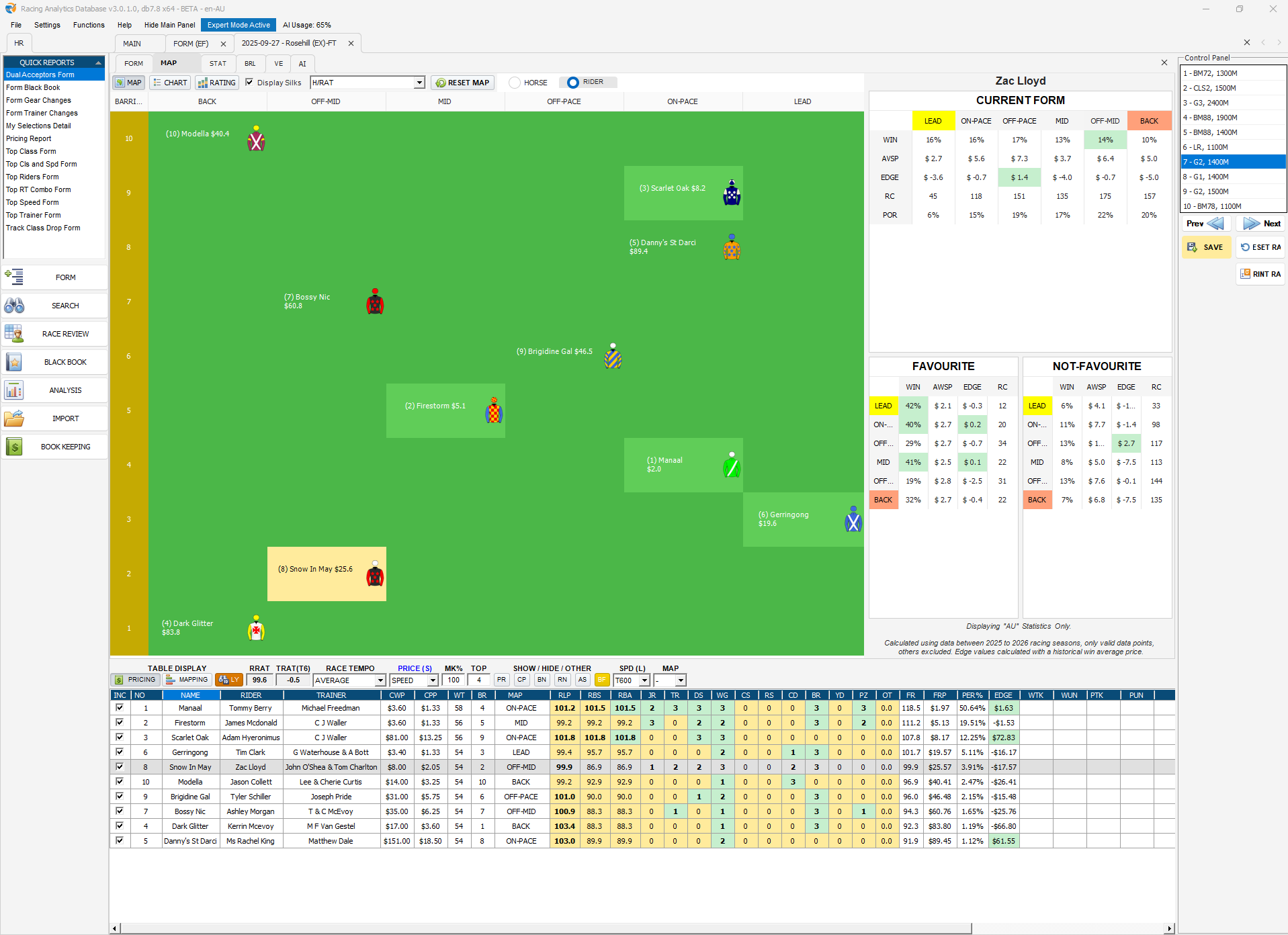
- Jockey / Trainer / Combo rating table:
- Now customizable and sortable.
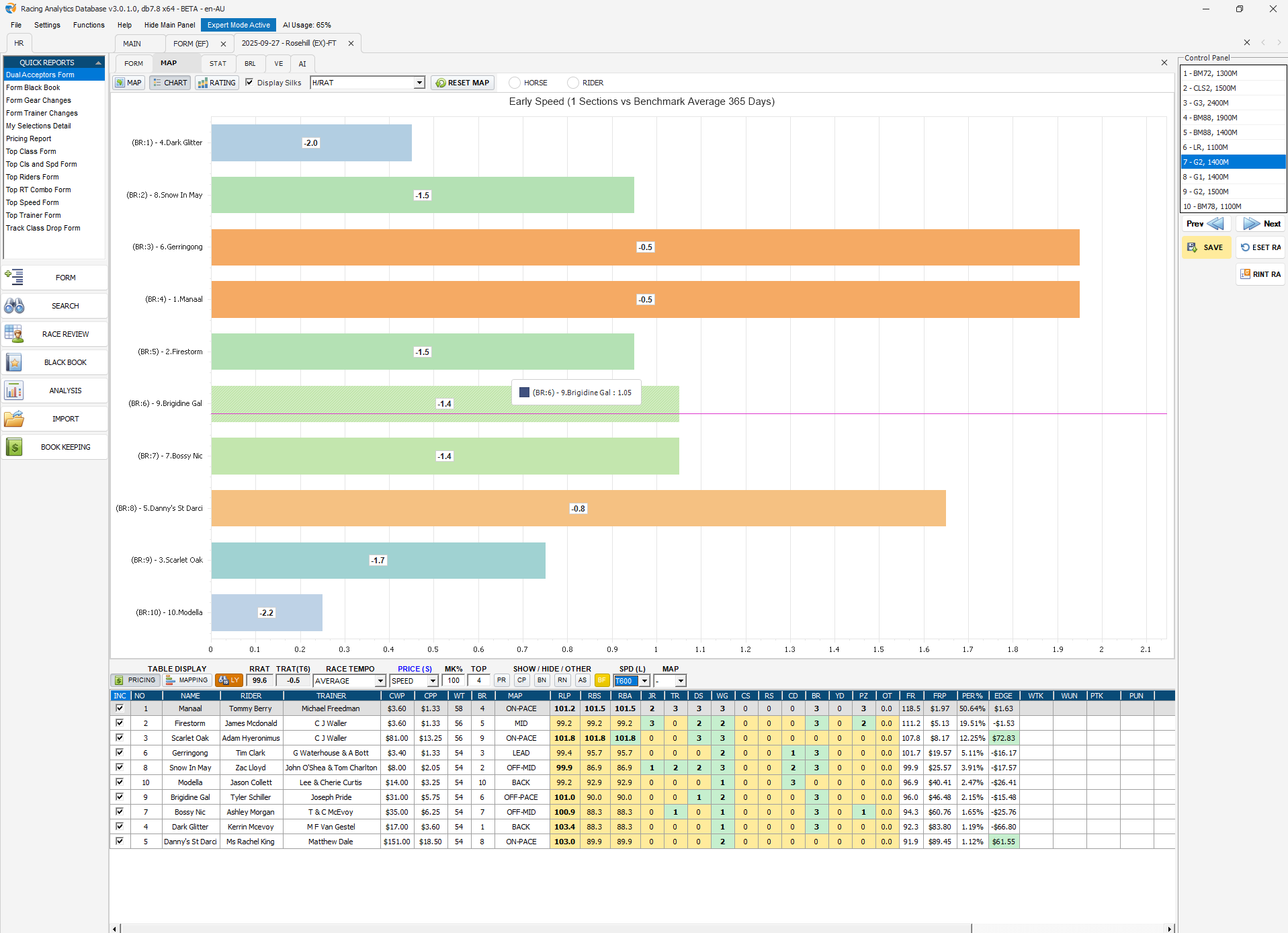
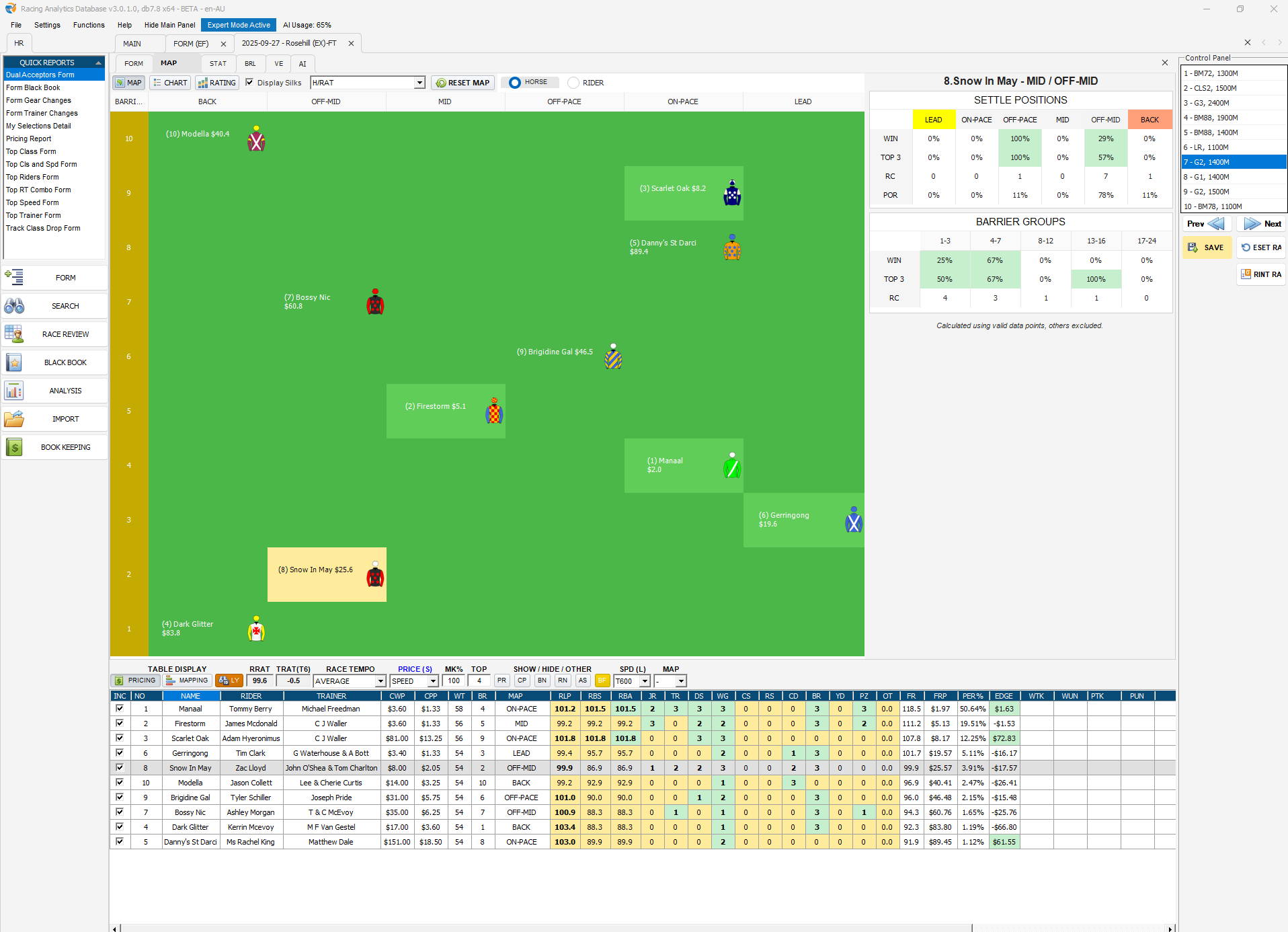
- Advanced mapping:
- Speed bar chart variables and improved mapping controls.
- Toggle stats display on/off as needed.
- Auto sync:
- Matrix and past-race adjustments now sync back to past runs in the Form Guide.
- Toggle between guides:
- Option to revert to the previous Form Guide in Expert Settings.
- 🖥️ Recommended hardware:
- 1920×1080+ resolution
- 8GB+ RAM
- SSD
- Intel i7 (or equivalent) for best experience
- ✅ Resolution handling:
- Minimum resolution handling fixed; 1920×1080 at 100% Windows zoom is now fully supported.
🤖 AI RAPRO Module (Expert / IVR)
Requires AI Module add-on subscription (Beginner & Intermediate plans available).
Availability
- Accessible in:
- Form Guide (Expert Form)
- Form Guide (IVR mode)
- Race Review (Expert Form)
Core Features
- Custom prompts and Short Codes (system + custom).
- Full race-form analysis:
- Scorecards
- Tables
- Top selections
- Runner profiles
- Post-race re-analysis
- Users can:
- Choose which variables AI can use
- Save chats and reload them later
AI-Specific Enhancements
- Class rating added to AI variable selection.
- Scratched runners are removed from AI data calculations.
- Crash-detection and Aria logging further refined to prevent looping.
- AI popup issues with abandoned races fixed.
🧮 Form & Layout Fixes / Adjustments (EX / IVR / SF)
Key fixes and adjustments across the new and legacy Form modules:
- Column behaviour:
- Trainer column width corrected.
- Columns now resize correctly across layouts.
- Duplicate RES / CRS columns removed.
- Race and rating alignment:
- Jockey / Trainer rating ranks in horse heads aligned with test system logic.
- Expert Form splits hover now correctly display conversion to lengths.
- Expert Form race pace “upcoming” vs “historical” wording aligned.
- IVR race pace filter updated in Form Guide.
- Colour code for race pace issues resolved.
- Tabs & memory:
- “Close tabs to the right” function added.
- Tab count limits tuned to avoid memory overload.
- Filters & layouts:
- New Form Filters now hold settings when changing runner, and replicate correctly across runners.
- Multiple layout, column, and resizing issues fixed in EX / IVR.
- Extra “Save splitter” locations added in Form and drill-down screens.
- Data and mapping behaviour:
- SPD adjustment now syncs correctly back when changed in Review.
- Display/hide scratched runners works as intended in pricing tables, with INCLUDE/EXCLUDE toggle.
- Mapping button now:
- Auto-selects the correct horse in the pricing table.
- No longer deselects the horse when using Print.
- IVR layouts and theme colours aligned to new Form module.
- Diss Diff and distance alignment fixes (including negative sign handling).
- Race class restriction now displays correctly in past form.
- Miscellaneous:
- YS Hover Commentary resolved.
- IVR form guide v7.1 and v10 various alignment and visual fixes.
- Past runs no longer include invalid scratching run lines with speed figures.
- Scratched runners in the new Form Guide layout can appear in the bottom table if unhidden; users have manual control to show or hide.
- IVR trial numbers now align with Expert race numbers (except where races are abandoned).
🏁 Race Review (Expert & IVR)
Race Review (Expert)
- 🆕 Quality Rating Index (QRI) Speed Adjustment:
- Allows users to adjust speed ratings based on:
- 3 leading “in-race” strength runners
- 3 “future” race strength runners leading out
- Allows users to adjust speed ratings based on:
- New Data Grid:
- Customisable layout with show/hide columns.
- Reorder columns and save configurations.
- Multi-column sorting supported.
- Pace & display alignment:
- Race pace headers, values, and splits realigned.
- Hover over conversion ratings now correctly displays lengths.
- Performance & stability:
- Backend saving performance improved.
- Sync-back behaviour to Form Guide enhanced.
- Colour coding issues across various variables resolved.
- QRI display updated to refresh correctly when switching races.
- Speed Chart button visibility fixed and aligned with Speed Add-on status.
Race Review (IVR)
- GMU in IVR mode realigned to use IVR margin only (not official margin).
- Winner logic updated to factor in positive winning margin.
- IVR trials matrix fixed so horses with a partially marked trial run appear correctly.
📊 Analyzer & Bookkeeping
- Backend analyzer performance enhanced with additional indexes.
- Average Prize Money (APM) added to the Analysis tool.
- Post-race position tags (e.g. “Lead”, “On-Pace”) added into Analysis, using the same logic as Review.
- New section vs race average variables added for IVR users (post race).
- Bookkeeping:
- Loading time reduced.
- Selections now load independently from the report table (which can be refreshed separately).
Betfair Enhancements
- Lay POT% for WinSP and PlaceSP now calculated based on profit ÷ total lay liability.
- Liability consistently defined as:
Lay Stake × (Betfair SP Lay − 1)
- Lay P/L values used in POT% formulas are now net of standard Betfair commission, so Lay POT% includes commission effects.
- Flat Lay POT% uses a fixed 100-unit lay model; Stake Lay POT% uses the staking-plan lay size.
- Both now share the same liability-based logic, so returns are expressed on risk, not nominal stake.
- Added extra checks/info in Model Manager to help identify and tidy orphaned auto-batch models.
- Stewards’ Commentary now flows correctly into Analysis and Race Review.
🧷 Other Fixes, UX & Stability
Loading & Feeds
- Loading splash screens introduced throughout the application, including an exit-safety splash.
- Improved scratching and result loading times from the central server.
- SP rank adjustments now ensure consistent pricing between Analysis and Form; updates occur earlier alongside scratching.
- Live feed:
- Issue with “right-click → attach as new tab” fixed.
Maps, Silks & Past Form
- Issues generating NZ / HK maps resolved.
- Past form set display issues fixed.
- Map reset no longer clears user comments or pricing.
- Silks clearing from HDD optimised to minimise space usage.
Layout & UI
- Tabs are now available in Form for multi-switching functionality.
- Minor layout changes for rider/trainer information in the Form Guide.
- Venue button layout redesigned.
- Comma display errors in IVR form guide (e.g. past commentary run lines) corrected.
- Main app and installer updated with latest Microsoft security fixes, drivers, and support frameworks.
- Database Optimize function removed from DB management and main page; front right panel button sizing corrected.
- Column chooser now includes mouse-hover tooltip descriptions.
Data, Ranking & Stability
- Backend index performance for data importing further refined.
- Post-race ranking now aligns with the v3.0.0.4.
- Data loading issues after fresh installs or major patches addressed.
- Past result settlement and stewards’ commentary issues fixed.
- FP stew com now correctly displays Fell, Lost Rider, and Failed to Finish.
- Trials DS adjusted for meetings where some trials were cancelled and others continued.
- Error popups when adding horse commentary/notes from Review resolved.
- QRI display now updates correctly when switching races.
- Race List behaviour for abandoned races fixed (shows “Abandon” and replaces rail text with an abandon notice).
- Speed Add-on handling:
- Speed chart button now hidden/disabled when Speed Add-on not enabled.
- Form Guide / Review meeting-list issue fixed when switching from “Exact” to the next day.
- “Prize Money (last start)” in Analyzer is now numeric and supports between / less / equal / greater filters.
- Prices now correctly hide in new Form Guide layout when “Hide prices” is ticked in IVR/EX modes.
- Review Sectional tooltips in EX Review now work as intended.
- Print Ratings order now updates correctly when horses are unticked from the pricing table.
📌 Notes for Users
- Activating the new Form Guide
- Go to Expert → Form Settings to enable the new Form Guide.
- An option is available to revert to the previous form guide if needed.
- AI RAPRO Module access
- Requires an active AI Module add-on subscription (Level 1+).
- If you encounter issues after updating
- Please back up your configuration.
- Contact support with screenshots and steps to reproduce so we can assist quickly.